Fionavar
Global Moderators
-
Joined
-
Last visited
Everything posted by Fionavar
-
Please send an inquiry through the contact form at the bottom of the fora.
-
There were some issues but hopefully they are now addressed. Are you still experiencing this, Bartimaeus?
-
Thanks for your understanding, Mizio. Welcome to the community and look forward to your contributions indeed!
-
Hi Mizio - yes functionality is reduced until the first five posts are approved.
-
Thanks, Hawke64, I will pass this on
-
Have you followed up after submission? That is the best way to explore this further
-
Heya SellSwordDev, Please explore the link here for further information: https://www.obsidian.net/careers/internships
-
DM Sent
-
Please monitor this page as this will be the best source for when things are updated: https://www.obsidian.net/careers/internships
-
I have followed up with DM
-
Hi Louey and Cody, Please touch base in DM and we can discuss next steps.
-
DM sent.
-
Hi there, DM sent.
-
Heya Wishtap, The new merch store is coming - look forward to letting the community know!
-
Hi Ali-Sama, Thanks for the affirmation and welcome to the community. Please reach out as you get your footing amidst the trolls, denizens, stalkers, and regulars
-
Hi there, I will follow-up via DM. Fionavar
-
As Gorth said, at the bottom of the page on the left hand side are your brightness settings :)

-
Have you tried logging out, clearing cookies, shutting down browser, then logging back in, @majestic ?
-
Grateful for the update @SChin ... we'll keep the trolls of grumpiness at bay
-
Heya OBS Community, New major update coming to the platform: https://forums.obsidian.net/announcement/75-forum-update/. Please post here or DM me so we can bug squish as quickly as possible
-
Happy Holidays indeed y'all! FYI https://forums.obsidian.net/announcement/74-happy-holidays/
-
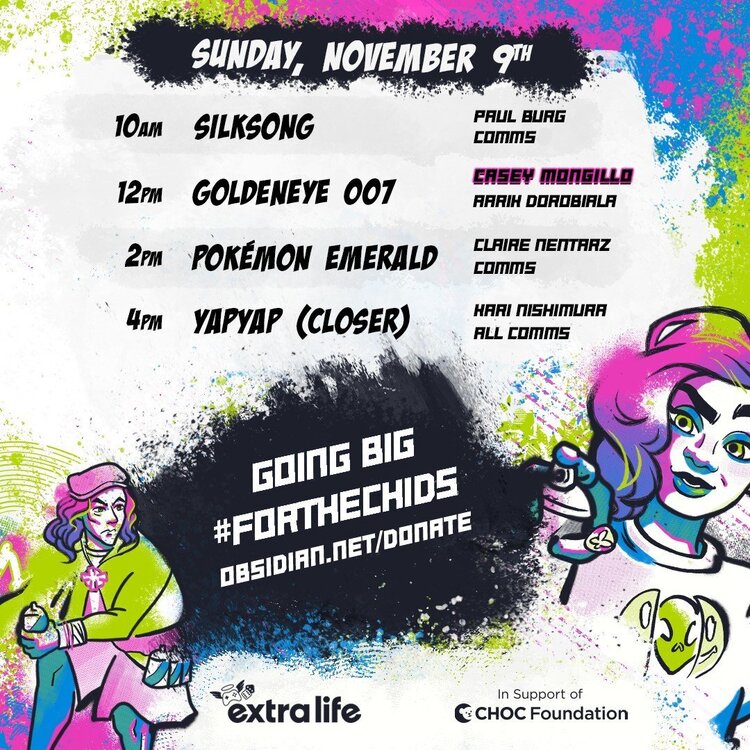
It's the final day of the 11th Annual Extra Life event. More gaming mayhem to support the chids!
-
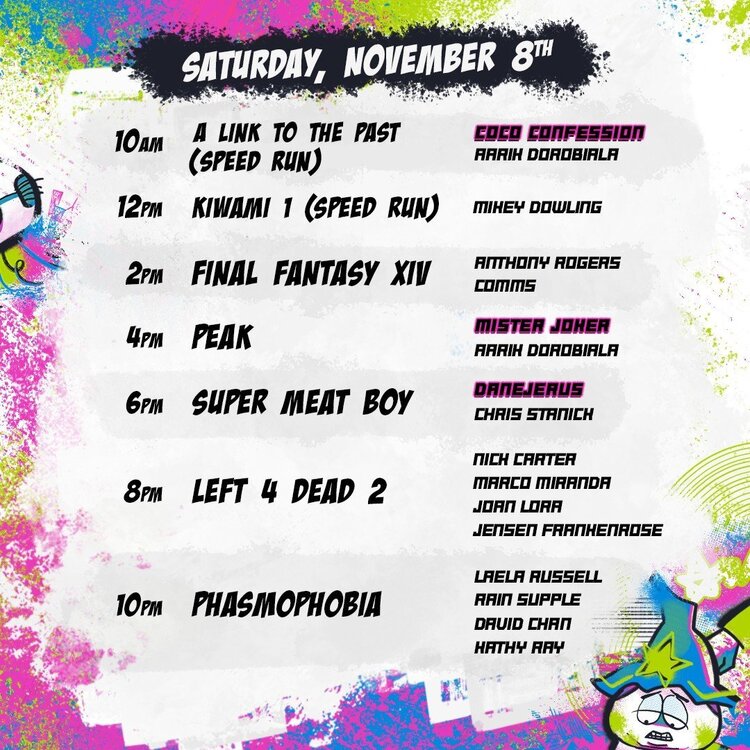
What an amazing day at Obsidian’s Extra Life 2025 weekend fundraiser! One of the many highlights was welcoming CHOC and hearing powerful stories about why Obsidian and its community support matters; helping children and families find hope and healing during tough times. Please considering joining us on Saturday! Come meet some of the incredible Obsidian team and friends who game for a cause, all to support CHOC. It's amazing how this 11th Annual event demonstrates how we can individually and help others!
-
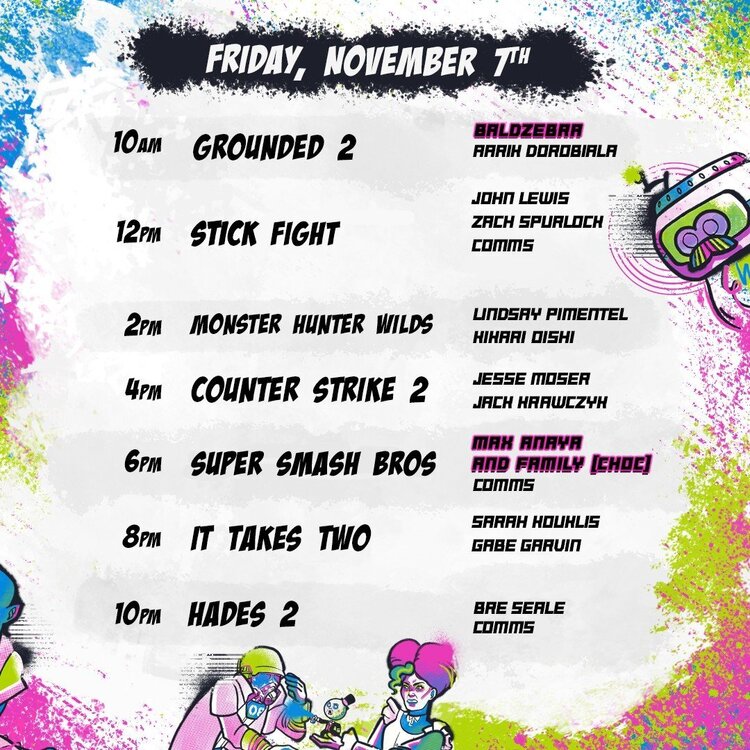
As the Thursday events continue, make sure to check tomorrow at 10 am! One of the highlights about which we're super stoked is to welcome Max Anaya & Family from CHOC, who will be rocking it with Super Smash Bros.
-
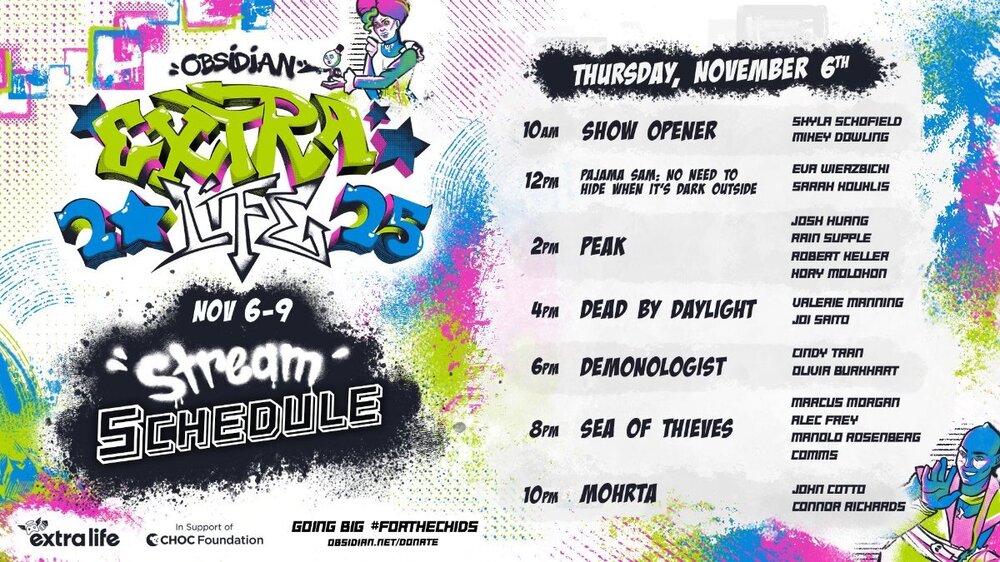
The 11th Annual ExtraLife4Kids Stream kicks off today with giveaways, special guests, and more! From the canvas to the cause, join our Obsidian developers and friends as we raise money for charity in support of the Children’s Hospital of Orange County. Check back regularly as each day's schedule is posted! Live Streams: https://www.twitch.tv/obsidian https://www.youtube.com/live/fjC894FKcPQ?si=hrffRn_pmJFF3UwN