


beatspores
Members
-
Joined
-
Last visited
-
beatspores replied to Kvellen's topic in Pillars of Eternity II: Deadfire: Modding (Spoiler Warning!)I've been thinking. Is there any other unity3d bundle that has the required components, and not already used by the game, one can edit? I'm thinking because it might be less of an operation in terms of file sharing size.
-
Yes. I wasn't clear but I meant if they ever get axed by Microsoft.
-
Hopefully they'll do another crowdfund thing. Pillars of Eternity III would be incredible.
-
I made something Necromatic you'll probably enjoy watching. More details to come on my mod...
-
beatspores replied to Cmushi's topic in Pillars of Eternity II: Deadfire: Modding (Spoiler Warning!)Do you have your mod available? I've been messing with a very similar thing, but can't get it to work. I think looking at the insides of how you made yours would help. Thanks!
-
beatspores replied to ebonfowl's topic in Pillars of Eternity II: Deadfire: Modding (Spoiler Warning!)Sounds good. This has been bugging me too.
-
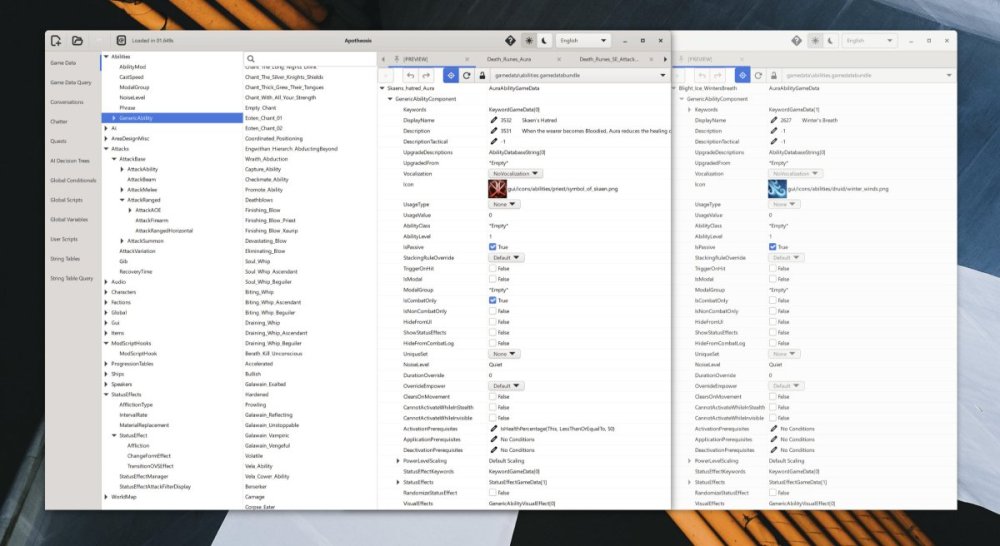
You can calm down, there's no stress! It's just a video game. 😁 Yes I thought about a comparison feature too. But I didn't want to mention / suggest it because I don't know how hard it is to make. For me, if I was the only one using the program, I would prefer having the feature of toggling tabs staying open while I traverse components. I found that, at least I, can open two instances of Apotheosis, as if it was two separate programs.
-
Sounds good! Another thing that I've thought about a lot, that would be soooo nicely accomodating: If one could set to have opened drop-down tabs for components, such as a GenericAbilityComponent's entry StatusEffects just as an example, stay open on all components when browsing around. Since I often don't "get," thus cannot freestyle, what I have to do to make something work as I intend I need to look up examples of other component's makeup, which I can then base my own component on and alter to the way I want it. So I very often have to look through a lot of components and entries in them. One case where this would really speed up things is when using the arrow keys to traverse components and having the components' opened and open/open/opened entries stay open. This feature would be sooo beautiful. 🤟 Perhaps a toggle next to the dark / light theme switch?
-
A couple of questions or feedback on Apotheosis that I've considered, now that I have had some time to dive deeper in this awesome application. I can't resize the list column widths. It would be very helpful as often there's a lot of x-space in the left columns that would be really beneficial to have on the "component side" on the right, especially when working with Conversations, which, by the way, is a level of refinement of a third party mod application I never ever would have expected. Also, if the column widths were adjustable, perhaps one can have the minimum x-size of the application smaller when multitasking with other windows, although this "requirement" is very seldom for me. - Its main window's space is including the drop shadow behind it. Is it possible to send the application's shadow to be handled by the OS? It would be preferrable to have it that way I think, for several reasons; one of them being able to click to select some other application's window behind Apotheosis. A very, very small nitpick, but since it's also UI-OS related I'll mention it anyway: I think the commonly seen Linux-oddity of rounded top borders but not bottom borders has sneaked its way into MS Windows. If it is a stylistic choice, I have no arguments against it. But if not, I thought I could mention it. I tried to get into Linux, a year or so ago, by installing Zorin. I tried my hardest but it was all above my software maintenance comprehension so eventually, unfortunately, I had to choose between going insane or to go back to Mac. And a final thing that crossed my mind is about the Game Data Query, which is very cool. I finally had some time to read through the instructions on how to use it correctly. Is it possible to query for component entries where for example "_ext" or "upper," et cetera, is a part somewhere in the name or reference or what one would call it? For example "_ext" would throw back results such as "district_town_exterior" or "ability_extended_time." - I was wondering, is it possible to export the entries in the query results as a list of some kind? Say the GUID's and / or the debug names. It could be very valuable if one is making a conditional script that must check against all the entries one caught through using the Query. Maybe Apotheosis could save the list of results one generated in some simple tab inside Game Data Query. Then one could reference that list in a conditional script, from ModScriptHook et cetera. And then Apotheosis just hands over to you a standard script with a ton of: IsRaining() and { IsInActiveScene(the_huge_list[0]) or IsInActiveScene(the_huge_list[1]) or IsInActiveScene(the_huge_list[2]) or IsAct... }But maybe it's very fringe stuff I'm touching here, maybe it's not worth the work needed to implement, I don't know. Anyway, again, tremendous application this! I'm making good progress with my mod right now and having fun tinkering with stuff!
-
I'm no wizard at modding but from what I've seen that should a 100 % be possible and probably not that difficult either if you know what other spells are doing something similar and you check what makes them work. For example the Watcher's Blade has Deny the Wheel enchantment that spawns a Shadow when you kill a kith enemy with the weapon. I'd wager you can copy that enchantment's mechanism to your necromancer spells. Also, as it happens, I'm doing precisely some necromancy-inspired modding with Apotheosis right now. I'm making my own sidekick. As in: an actual sidekick - not just an exported adventurer. It has custom voice, chatter, conversation, unique subclass, item, "altered subrace," and so on. The necromancer subclass is not for any spellcaster class; it will be unique for my sidekick's, and it's tied to the character's backstory. My little project wouldn't have had a chance to begin with if it weren't for Apotheosis, among others; the tool is indispensable!
-
beatspores replied to Majber's topic in Pillars of Eternity II: Deadfire: Modding (Spoiler Warning!)b6d48764-123a-4e3f-a6a7-c1f0ee773f60 Should be the ID for Goldpact Knights.
-
100 %!
-
beatspores replied to Kvellen's topic in Pillars of Eternity II: Deadfire Stories (Spoiler Warning!)Maybe it was the ship she mentions she sailed on when you recruit her. A successful experiment and... "the details are unimportant," because the details involve a ship in pieces and a few dead fellows...?
-
While I don't know, having never developed a game myself, I would strongly suspect making a 2D game with isometric presentation to be considerably more straight-forward, and has you using your hours on something that leverages your gameplay and not something that's only under the hood. Instead of x-y-z you only have to think in x-y. I guess the most direct analogy is maths when you have to add dimensions, as the product is non-linear: 2x times 2y is 4, while 2x times 2y times 2z is 8 -- double the total of what you had to take in account going only x-y. For example you can drop everything about 3D rendering, lighting, more complex pathing, etc etc. The Pillars games' presentation is rendered 3D, so it's 2D when you're playing the game. The only things still real-time rendered in 3D are basically the characters / NPC's, and a miniscule numbers of special effects, some doors et cetera. But because the characters are in 3D, they still had to add dynamic lighting on top of their 2D. The final product is as you know absolutely beautiful, but there's still considerable time investment to achieve it. But again, the gameplay is 2D. Again, I'm not a game developer so take my thoughts for what they are. But I hope they've given you some things to consider. Best of luck to you whatever you choose!
-
beatspores replied to ebonfowl's topic in Pillars of Eternity II: Deadfire: Modding (Spoiler Warning!)Perhaps there's a work around one can do in Apotheosis or a code editor. Maybe if you can set the required XP to fill the beastiary entry to some absurd number. Or a script that resets the accumulated XP for the beastiary after each time it got added. This would of course make the entry forever unfilled but I guess most players never use it anyway.


