


Noqn
Members
-
Joined
-
Last visited
-
Thaos' strongest soldier.
-
-
Forgot to write but I've added gitlab issues for all suggestions/bugs posted lately so that I've got a neat to-do list. I'm hopefully gonna have time to take a look at things once vacation starts, but right now I've got really fun stuff to do at work so my brain is all wrapped up in that.
-
Hi, sorry for the late reply to these posts! I'll take a look at the issues/suggestions posted hopefully next week, the remainder of this weekend I'll be busy. aah yeah gonna check that out too Ah, interesting. I've considered adding a "comparison" view, displaying two GameDataObjects side by side. Maybe it would be nice to combine it with that... Oh, I'm going to check out the special character issue, thanks for reporting. I'll take a look at the terminal Exception, again thanks for reporting and sorry for the issues!
-
Hm, I think I'm going to combine this feature with something else I've been thinking about... Combining GameDataObject-level queries, something like: Item || GodChallengeor more complex stuff like GodChallenge || Item { Soulbind || #IsUnique }In this case we could insert DebugName like this DebugName &= "woedica" && (Item || GenericAbility)
-
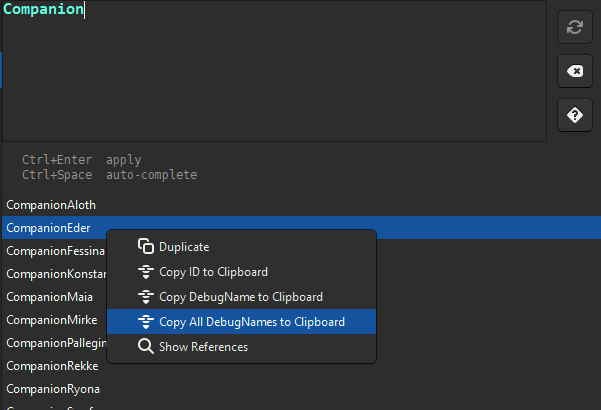
❤️ Thanks, that's great feedback, I'll take a look at it when I next work on Apotheosis. Ugh yeah this is incredibly obnoxious behavior from GTK. It also makes Windows' snippet tool and various recording software misjudge the size of the window... iirc I found a way to strip the shadows away but it caused really small border margins for resizing the window, though I can see if I can enable it for the next release and see if anyone is bothered. Good feature request, I'll have to think about the syntax first, where to expose the DisplayName query Really glad to hear people using the Query, it's another feature I'm very happy about 😊 Ah yeah this feature does exist! If you right-click any item in the result view, you also get the option "Copy All DebugNames to Clipboard" Another good feature suggestion, I'll think about this too. On the top of my head, I've exposed some APIs for queries when writing User Scripts: https://gitlab.com/noqn/apotheosis/-/wikis/User-Scripts#api You can see an example here: https://gitlab.com/noqn/apotheosis/-/wikis/User-Scripts#iterating-through-gamedataobjects foreach (var grimoireWithFireball in GameData.Query("*Grimoire.Spells[*]=Fireball")) { // Iterate through all GameDataObjects matching a specific Query }You could then dynamically build a big conditional/script based on these results, but then you would have to work with the ConditionalExpression/ScriptCall models which have a much more painful structure under the hood than the scripts you see in Apotheosis. I'll also think about providing more convenience features for building conditionals/scripts with code.
-
ah ship CTD bug report jumpscare NEW RELEASE!! I realized now that the right description would be "non-ghost child nodes", oh well...

-
Really, really cool find. Would've been an awesome introduction, fitting fampyr vibes at the very least. Her intro convo is in the 20_splintered_reef folder so maybe that's where she would've been found around. this made me remember the Fig campaign stretch goal that would've made her a full companion that we never got 🥹
-
Noqn replied to somebody_else24's topic in Pillars of Eternity II: Deadfire: Modding (Spoiler Warning!)Apotheosis has a convenient GUI for this: Small documentation on progression tables: https://gitlab.com/noqn/apotheosis/-/wikis/home#progressiontables You can see the video here how it works:
-
Sorry for the late reply, I don't think that's possible based on the available scripts sadly https://eternity.obsidian.net/game-data-formats/scripts
-
Better late than never, but new patch out! https://i.imgur.com/dETNGrL.png 2025-07-20 Quest Node descriptions are now displayed and editable. 2025-07-19 (2) Quest Objective Node titles are now displayed and editable. Just realized I might've fixed this by accident in the 2025-07-18 release 😅
-
Ah good finds, new patch out 😅 2025-07-19 Chatter AudioLookup entries are now written ordered by keys. Creating a ChatterNode from a parent String Table will now properly update the AudioLookup map. Creating a ChatterNode from a parent String Table will now properly enable the popup's Accept button when an Entry is selected.
-
In a future update I want to hide the RandomWeight input unless the parent PlayType is random.
-
2025-07-18 Adjusted buttons on Chatter nodes: ChatterEventData - Removed Persistence dropdown, added NoPlayRandomWeight input if PlayType is set to Random or CycleRandom. ChatterNode - Added PlayRandomWeight input. ScriptNode - Added PlayRandomWeight input, added NoPlayRandomWeight input if PlayType is set to Random or CycleRandom. (also ChatterLink RandomWeight is not properly initialized) Basically the overlapping buttons will look like this: ChatterNode ScriptNode ChatterEventData PlayType NO YES YES NoPlayRandomWeight NO YES YES RandomWeight YES YES NO Persistence YES YES NO DisplayType YES NO NO
-
2025-07-06 (2) Added "Open WEM" button to Conversation Talk Nodes.



