


Noqn
Members
-
Joined
-
Last visited
Everything posted by Noqn
-
Thaos' strongest soldier.
-
-
Forgot to write but I've added gitlab issues for all suggestions/bugs posted lately so that I've got a neat to-do list. I'm hopefully gonna have time to take a look at things once vacation starts, but right now I've got really fun stuff to do at work so my brain is all wrapped up in that.
-
Hi, sorry for the late reply to these posts! I'll take a look at the issues/suggestions posted hopefully next week, the remainder of this weekend I'll be busy. aah yeah gonna check that out too Ah, interesting. I've considered adding a "comparison" view, displaying two GameDataObjects side by side. Maybe it would be nice to combine it with that... Oh, I'm going to check out the special character issue, thanks for reporting. I'll take a look at the terminal Exception, again thanks for reporting and sorry for the issues!
-
Hm, I think I'm going to combine this feature with something else I've been thinking about... Combining GameDataObject-level queries, something like: Item || GodChallengeor more complex stuff like GodChallenge || Item { Soulbind || #IsUnique }In this case we could insert DebugName like this DebugName &= "woedica" && (Item || GenericAbility)
-
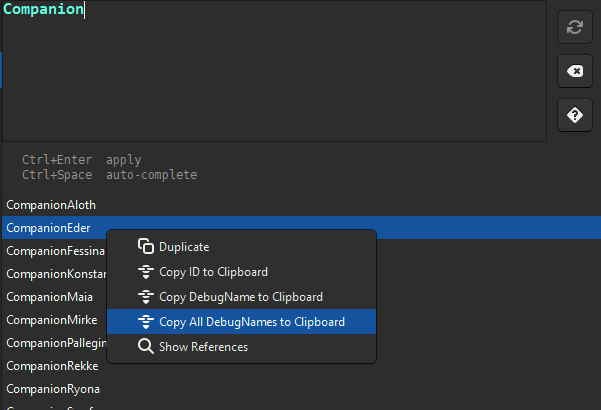
❤️ Thanks, that's great feedback, I'll take a look at it when I next work on Apotheosis. Ugh yeah this is incredibly obnoxious behavior from GTK. It also makes Windows' snippet tool and various recording software misjudge the size of the window... iirc I found a way to strip the shadows away but it caused really small border margins for resizing the window, though I can see if I can enable it for the next release and see if anyone is bothered. Good feature request, I'll have to think about the syntax first, where to expose the DisplayName query Really glad to hear people using the Query, it's another feature I'm very happy about 😊 Ah yeah this feature does exist! If you right-click any item in the result view, you also get the option "Copy All DebugNames to Clipboard" Another good feature suggestion, I'll think about this too. On the top of my head, I've exposed some APIs for queries when writing User Scripts: https://gitlab.com/noqn/apotheosis/-/wikis/User-Scripts#api You can see an example here: https://gitlab.com/noqn/apotheosis/-/wikis/User-Scripts#iterating-through-gamedataobjects foreach (var grimoireWithFireball in GameData.Query("*Grimoire.Spells[*]=Fireball")) { // Iterate through all GameDataObjects matching a specific Query }You could then dynamically build a big conditional/script based on these results, but then you would have to work with the ConditionalExpression/ScriptCall models which have a much more painful structure under the hood than the scripts you see in Apotheosis. I'll also think about providing more convenience features for building conditionals/scripts with code.
-
ah ship CTD bug report jumpscare NEW RELEASE!! I realized now that the right description would be "non-ghost child nodes", oh well...

-
Really, really cool find. Would've been an awesome introduction, fitting fampyr vibes at the very least. Her intro convo is in the 20_splintered_reef folder so maybe that's where she would've been found around. this made me remember the Fig campaign stretch goal that would've made her a full companion that we never got 🥹
-
Noqn replied to somebody_else24's topic in Pillars of Eternity II: Deadfire: Modding (Spoiler Warning!)Apotheosis has a convenient GUI for this: Small documentation on progression tables: https://gitlab.com/noqn/apotheosis/-/wikis/home#progressiontables You can see the video here how it works:
-
Sorry for the late reply, I don't think that's possible based on the available scripts sadly https://eternity.obsidian.net/game-data-formats/scripts
-
Better late than never, but new patch out! https://i.imgur.com/dETNGrL.png 2025-07-20 Quest Node descriptions are now displayed and editable. 2025-07-19 (2) Quest Objective Node titles are now displayed and editable. Just realized I might've fixed this by accident in the 2025-07-18 release 😅
-
Ah good finds, new patch out 😅 2025-07-19 Chatter AudioLookup entries are now written ordered by keys. Creating a ChatterNode from a parent String Table will now properly update the AudioLookup map. Creating a ChatterNode from a parent String Table will now properly enable the popup's Accept button when an Entry is selected.
-
In a future update I want to hide the RandomWeight input unless the parent PlayType is random.
-
2025-07-18 Adjusted buttons on Chatter nodes: ChatterEventData - Removed Persistence dropdown, added NoPlayRandomWeight input if PlayType is set to Random or CycleRandom. ChatterNode - Added PlayRandomWeight input. ScriptNode - Added PlayRandomWeight input, added NoPlayRandomWeight input if PlayType is set to Random or CycleRandom. (also ChatterLink RandomWeight is not properly initialized) Basically the overlapping buttons will look like this: ChatterNode ScriptNode ChatterEventData PlayType NO YES YES NoPlayRandomWeight NO YES YES RandomWeight YES YES NO Persistence YES YES NO DisplayType YES NO NO
-
2025-07-06 (2) Added "Open WEM" button to Conversation Talk Nodes.
-
Thanks, I messed up and didn't let the ScriptNode gui widgets inherit the elements from the DialogueNode widgets 😅 I pushed a fix which should be available now. This is ok, it won't affect deserialization.
-
I ended up doing some very heavy refactoring on flowchart-related code. Everything should still work, but if you have some important conversation/chatter/quest projects in progress it might be a good time to take a backup on those just in case.
-
Finally, new release! Chatter Support! 🥳 @Kvellen I changed the "highlight in folder"-button to instead play all matching files in the user's .wem associated media player, if available:
-
Tried some changes to chatter made through Apotheosis in-game and it works! I've got some cleaning up and refactoring to do so I think a new release this sunday would be a bit too optimistic, but hopefully next weekend. Some notes: I've initially disabled copy/pasting ghost nodes in Chatters for now, since they're barely ever used in vanilla files and I want to think a bit more about the UX and possible quirks. (The most notable Ghost nodes are used in Xoti's chatter - several events lead to the same chatter node where she groans/complains. Feels like a good example of how they can be useful, so I want to add them eventually.) Vanilla Ghost Nodes will still be displayed correctly. At one point I was pulling some data and put it into a .csv file, which made me realize that a table would be a really good overview of the ChatterEventData in general. I want to make a view something like this later on:

-
Honestly, I hadn't considered this until you wrote it 😅 I imagine it was useful from a developer perspective, for stuff like syncing voice actor lines. It could maybe be useful for us if I make some templates based on these? Like if someone's adding a ChanterChant1 "branch" it'll always default to this: This is gold, I'm still laughing at this image 🤣
-
I might've misunderstood the question but the SpeakerComponent.ChatterPrefix value will be used when determining the .wem path, so two speakers will have separate file paths for identical nodes even if they point to the same Chatter Aah wait, nvm I get it... Yeah as I've implemented it right now, it will select the .wem of the first matching speaker with that Chatter. I'll maybe have to think a bit more about that feature later...
-
@Kvellen I thought I'd write down some discoveries about Chatters and show some progress: Nodes - Chatters only have 2 noteworthy Node types - ChatterNode and ChatterEventData. ChatterEventData each act like a "Root Node" (see the video below ) and will contain one or more ChatterNode children. Each ChatterEventData is connected to a specific event (such as casting a spell or being given a unique item by the Watcher) that could trigger a voice line. ChatterNode - defines a specific voice line that could be played. Each ChatterNode has a corresponding .wem audio file. ChatterNodes can't have children. ScriptNode - may be inserted between ChatterEventData and ChatterNode children to add common Conditionals to several children. StringTableFilenames - Defines which StringTables the Chatter should fetch entries from. Each Chatter will utilize its own unique table (should be the first in the StringTableFilenames list), but also has the option to fetch entries from other "generic" tables. Which table in StringTableFilenames a ChatterNode should fetch text from will be determined from the NodeID. Nodes with a NodeID starting with X0'000 will fetch the table with (zero-based) index X in StringTableFilenames. If we have for example "NodeID": 20017, then the from the tables below it should fetch "chatter/parents/chp_chanter_casts.stringtable" (the 3rd entry in the list) "StringTableFilenames": [ "chatter/00_companions/ch_companion_pallegina_voice_set.stringtable", "chatter/parents/chp_barbarian_shout.stringtable", "chatter/parents/chp_chanter_casts.stringtable", "chatter/parents/chp_cipher_casts.stringtable", "chatter/parents/chp_common.stringtable", "chatter/parents/chp_ko.stringtable", "chatter/parents/chp_paladin_commands.stringtable", "chatter/parents/chp_wizard_casts.stringtable" ], As you can see in the video below, I've removed the "edit text button" from Nodes with IDs greater than 10'000, so that the user is only able to edit the Chatter's own string table entries. AudioLookup - These can be auto-generated and refreshed when the Chatter is edited, how the strings are calculated is similar to .wem paths which is described below. Manifests - From what I looked at the decompiled code, Chatters will require a manifest file similar to Conversations, though the contents seem to be a bit different. It's something I'll have to look a bit more into. .wem paths - The path to the .wem file of a ChatterNode will be determined by The character's SpeakerGameData -> SpeakerComponent -> ChatterPrefix The EventType value of the ChatterNode's ChatterEventData parent. (The exact EventType -> string mappings are defined in the ChatterEventsGameData named "chatter" available under "Audio"). The ChatterNode ID <SpeakerComponent.ChatterPrefix>\ch_<SpeakerComponent.ChatterPrefix>_<EventType>_<NodeID>.wem eder\ch_eder_item_purchase_rare_0153.wem \PillarsOfEternityII_Data\StreamingAssets\Audio\Windows\Voices\English(US)\eder\ch_eder_item_purchase_rare_0153.wem I added a button for opening and highlighting a ChatterNode's .wem file in the users file manager. (Though not included in the preview video...)
-
The Pet slot is unlocked with a specific ability (Unlock_Pet_Slot), iirc a script in one of the the prologue conversations give this ability to Eder. There's actually an existing mod that does this more or less: https://www.nexusmods.com/pillarsofeternity2/mods/400 (though I think it unlocks the pet slots without taking Can I Pet Him Too into account) I checked and it does it by creating a BaseProgressionTableAppendGameData object that effectively adds the Unlock_Pet_Slot ability to all party members' Ability Trees (though hidden).
-
Oh and I second Kvellen, really good mod concept 👍
-
Each ModScriptHook will automatically trigger every time the player enters a new scene or loads a save. You can add conditionals to the hook, and set whether it should only trigger a single time, etc: https://eternity.obsidian.net/game-data-formats/components#modscripthookcomponent In Apotheosis it can be found under Game Data -> ModScriptHooks -> ModScriptHook





