

Search the Community
Showing results for tags 'textures'.
Found 6 results
-
 Hi, Does anyone know how to fix this texture bug. I'm playing on gamepass if that helps. Intel Arc A750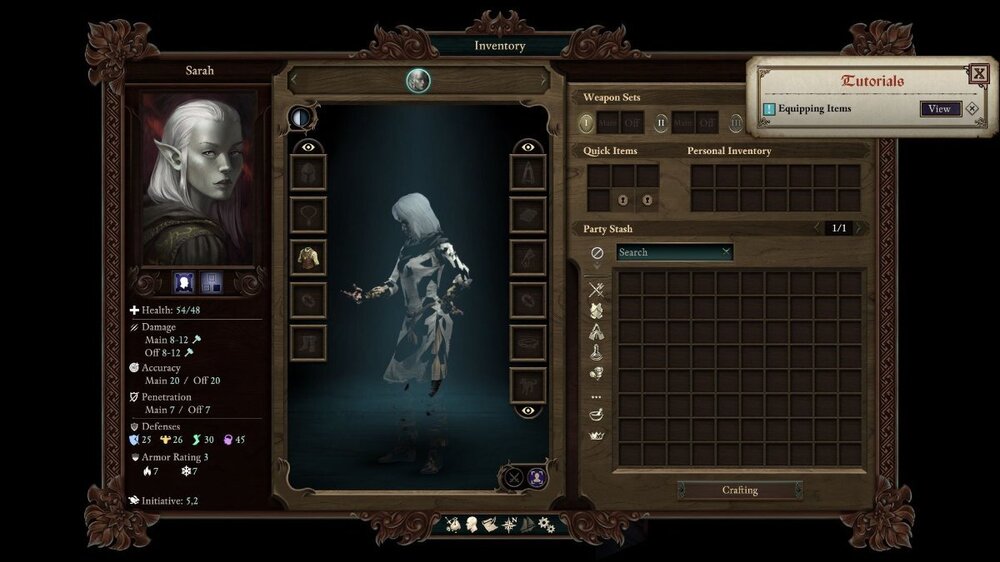
-
 So I've got a graphical bug when the graphics settings are on anything below maximum the textures don't load properly and everything looks like it's made of wax/on PS2. When I change the graphics to medium, or open then close the pause menu with them on medium, the textures load for about half a second, then disappear. This isn't game breaking, but my computer isn't good enough to run the game on max graphics without massive lag, so it would be nice if the textures worked on medium to high. This same issue is present on all graphics settings except maximum, playing on PC from the Windows Store (rather than the Epic Store) Pic related
-
 Guys, what's going on with textures on PS4? It looks like half of the objects in-game doesn't have textures at all! Also very weird lighting changes and weapon textures loading while aiming. Am I the only one who has these problems? I'm very confused, because this is the worst textures I ever saw on PS4. Playing on PS4 Pro, 4K 50" TV
 -
 Hi, is there any way to make transparent textures using AssetsBundleExtractor? For example to remove the top from hide armor to make it looks more barbaric.
 -
 So basically I'd like to try modding some of the textures in the game, but I'm having a hard time finding the assets. I already found weapon icons, meshes, and textures. They're located in Pillars of Eternity\PillarsOfEternity_Data\assetbundles\prefabs\objectbundle But I can't figure out where to find the files for armor textures, character basemeshes, monsters, etc. Anyone know? Post ITT if you have a modding related question, I guess, until we get a dedicated modding subforum.
 -
 I have just now arrived at Aedelwan Bridge, and none of the textures are loading. I've tried messing with the graphics, but no such luck. Mac OS X 10.10.2 NVIDIA GeForce GT 750M i7 processor From Player.log: (Filename: /Applications/buildAgent/work/d63dfc6385190b60/artifacts/MacStandalonePlayerGenerated/UnityEngineDebug.cpp Line: 49) ------- BEGIN LEVEL LOAD INITIATED -------- Pending level = AR_0112_Bridge_District. (Filename: /Applications/buildAgent/work/d63dfc6385190b60/artifacts/MacStandalonePlayerGenerated/UnityEngineDebug.cpp Line: 49) Checking to instantiate global... (Filename: /Applications/buildAgent/work/d63dfc6385190b60/artifacts/MacStandalonePlayerGenerated/UnityEngineDebug.cpp Line: 49) Checking to instantiate in game global... (Filename: /Applications/buildAgent/work/d63dfc6385190b60/artifacts/MacStandalonePlayerGenerated/UnityEngineDebug.cpp Line: 49) Instantiating in game global. (Filename: /Applications/buildAgent/work/d63dfc6385190b60/artifacts/MacStandalonePlayerGenerated/UnityEngineDebug.cpp Line: 49) -------- LEVEL LOAD COMPLETE -------- Level = AR_0112_Bridge_District. (Filename: /Applications/buildAgent/work/d63dfc6385190b60/artifacts/MacStandalonePlayerGenerated/UnityEngineDebug.cpp Line: 49) UnloadTime: 130.240616 ms Checking to instantiate global... (Filename: /Applications/buildAgent/work/d63dfc6385190b60/artifacts/MacStandalonePlayerGenerated/UnityEngineDebug.cpp Line: 49) Checking to instantiate in game global... (Filename: /Applications/buildAgent/work/d63dfc6385190b60/artifacts/MacStandalonePlayerGenerated/UnityEngineDebug.cpp Line: 49) Unloading 67 Unused Serialized files (Serialized files now loaded: 4 / Dirty serialized files: 0) Unloading 651 unused Assets to reduce memory usage. Loaded Objects now: 29141. Total: 41.827782 ms (FindLiveObjects: 1.616757 ms CreateObjectMapping: 2.297883 ms MarkObjects: 34.265121 ms DeleteObjects: 2.932736 ms) The asset bundle '/Users/ccompton/Library/Application Support/Steam/SteamApps/common/Pillars of Eternity/PillarsOfEternity.app/Contents/assetbundles/st_ar_0112_bridge_district.assetbundle' can't be loaded because it was not built with the right version or build target. (Filename: Line: 714) Error trying to load asset bundle /Users/ccompton/Library/Application Support/Steam/SteamApps/common/Pillars of Eternity/PillarsOfEternity.app/Contents/assetbundles/st_ar_0112_bridge_district.assetbundle (Filename: /Applications/buildAgent/work/d63dfc6385190b60/artifacts/MacStandalonePlayerGenerated/UnityEngineDebug.cpp Line: 49) NullReferenceException: Object reference not set to an instance of an object at PE_StreamTileManager.LoadTexture (UnityEngine.AssetBundle bundle, System.String levelDataPath, System.String texturePath, System.String fileName, System.String fileExtension) [0x00000] in <filename unknown>:0 at PE_StreamTile.LoadTextures (UnityEngine.AssetBundle bundle, System.String levelPath, System.String levelName, .LevelInfo levelInfo) [0x00000] in <filename unknown>:0 at PE_StreamTile.SetTileCoords (Int32 tileX, Int32 tileY) [0x00000] in <filename unknown>:0 at PE_StreamTileManager.UpdateStreamTilePool () [0x00000] in <filename unknown>:0 at PE_StreamTileManager.DoUpdate () [0x00000] in <filename unknown>:0 at PE_GameRender.DoUpdate (Boolean updateCameraControl) [0x00000] in <filename unknown>:0 at PE_GameRender.Update () [0x00000] in <filename unknown>:0 (Filename: Line: 4294967295) NullReferenceException: Object reference not set to an instance of an object at PE_StreamTileManager.LoadTexture (UnityEngine.AssetBundle bundle, System.String levelDataPath, System.String texturePath, System.String fileName, System.String fileExtension) [0x00000] in <filename unknown>:0 at PE_StreamTile.LoadTextures (UnityEngine.AssetBundle bundle, System.String levelPath, System.String levelName, .LevelInfo levelInfo) [0x00000] in <filename unknown>:0 at PE_StreamTile.SetTileCoords (Int32 tileX, Int32 tileY) [0x00000] in <filename unknown>:0 at PE_StreamTileManager.UpdateStreamTilePool () [0x00000] in <filename unknown>:0 at PE_StreamTileManager.DoUpdate () [0x00000] in <filename unknown>:0 at PE_GameRender.DoUpdate (Boolean updateCameraControl) [0x00000] in <filename unknown>:0 at PE_GameRender.Update () [0x00000] in <filename unknown>:0 (Filename: Line: 4294967295) NullReferenceException: Object reference not set to an instance of an object at PE_StreamTileManager.LoadTexture (UnityEngine.AssetBundle bundle, System.String levelDataPath, System.String texturePath, System.String fileName, System.String fileExtension) [0x00000] in <filename unknown>:0 at PE_StreamTile.LoadTextures (UnityEngine.AssetBundle bundle, System.String levelPath, System.String levelName, .LevelInfo levelInfo) [0x00000] in <filename unknown>:0 at PE_StreamTile.SetTileCoords (Int32 tileX, Int32 tileY) [0x00000] in <filename unknown>:0 at PE_StreamTileManager.UpdateStreamTilePool () [0x00000] in <filename unknown>:0 at PE_StreamTileManager.DoUpdate () [0x00000] in <filename unknown>:0 at PE_GameRender.DoUpdate (Boolean updateCameraControl) [0x00000] in <filename unknown>:0 at PE_GameRender.Update () [0x00000] in <filename unknown>:0 (Filename: Line: 4294967295) NullReferenceException: Object reference not set to an instance of an object at PE_StreamTileManager.LoadTexture (UnityEngine.AssetBundle bundle, System.String levelDataPath, System.String texturePath, System.String fileName, System.String fileExtension) [0x00000] in <filename unknown>:0 at PE_StreamTile.LoadTextures (UnityEngine.AssetBundle bundle, System.String levelPath, System.String levelName, .LevelInfo levelInfo) [0x00000] in <filename unknown>:0 at PE_StreamTile.SetTileCoords (Int32 tileX, Int32 tileY) [0x00000] in <filename unknown>:0 at PE_StreamTileManager.UpdateStreamTilePool () [0x00000] in <filename unknown>:0 at PE_StreamTileManager.DoUpdate () [0x00000] in <filename unknown>:0 at PE_GameRender.DoUpdate (Boolean updateCameraControl) [0x00000] in <filename unknown>:0 at PE_GameRender.Update () [0x00000] in <filename unknown>:0 (Filename: Line: 4294967295) NullReferenceException: Object reference not set to an instance of an object at PE_StreamTileManager.LoadTexture (UnityEngine.AssetBundle bundle, System.String levelDataPath, System.String texturePath, System.String fileName, System.String fileExtension) [0x00000] in <filename unknown>:0 at PE_StreamTile.LoadTextures (UnityEngine.AssetBundle bundle, System.String levelPath, System.String levelName, .LevelInfo levelInfo) [0x00000] in <filename unknown>:0 at PE_StreamTile.SetTileCoords (Int32 tileX, Int32 tileY) [0x00000] in <filename unknown>:0 at PE_StreamTileManager.UpdateStreamTilePool () [0x00000] in <filename unknown>:0 at PE_StreamTileManager.DoUpdate () [0x00000] in <filename unknown>:0 at PE_GameRender.DoUpdate (Boolean updateCameraControl) [0x00000] in <filename unknown>:0 at PE_GameRender.Update () [0x00000] in <filename unknown>:0 (Filename: Line: 4294967295) NullReferenceException: Object reference not set to an instance of an object at PE_StreamTileManager.LoadTexture (UnityEngine.AssetBundle bundle, System.String levelDataPath, System.String texturePath, System.String fileName, System.String fileExtension) [0x00000] in <filename unknown>:0 at PE_StreamTile.LoadTextures (UnityEngine.AssetBundle bundle, System.String levelPath, System.String levelName, .LevelInfo levelInfo) [0x00000] in <filename unknown>:0 at PE_StreamTile.SetTileCoords (Int32 tileX, Int32 tileY) [0x00000] in <filename unknown>:0 at PE_StreamTileManager.UpdateStreamTilePool () [0x00000] in <filename unknown>:0 at PE_StreamTileManager.DoUpdate () [0x00000] in <filename unknown>:0 at PE_GameRender.DoUpdate (Boolean updateCameraControl) [0x00000] in <filename unknown>:0 at PE_GameRender.Update () [0x00000] in <filename unknown>:0 (Filename: Line: 4294967295) Checking to instantiate global... (Filename: /Applications/buildAgent/work/d63dfc6385190b60/artifacts/MacStandalonePlayerGenerated/UnityEngineDebug.cpp Line: 49) Checking to instantiate in game global... (Filename: /Applications/buildAgent/work/d63dfc6385190b60/artifacts/MacStandalonePlayerGenerated/UnityEngineDebug.cpp Line: 49) NullReferenceException: Object reference not set to an instance of an object at PE_StreamTileManager.LoadTexture (UnityEngine.AssetBundle bundle, System.String levelDataPath, System.String texturePath, System.String fileName, System.String fileExtension) [0x00000] in <filename unknown>:0 at PE_StreamTile.LoadTextures (UnityEngine.AssetBundle bundle, System.String levelPath, System.String levelName, .LevelInfo levelInfo) [0x00000] in <filename unknown>:0 at PE_StreamTile.SetTileCoords (Int32 tileX, Int32 tileY) [0x00000] in <filename unknown>:0 at PE_StreamTileManager.UpdateStreamTilePool () [0x00000] in <filename unknown>:0 at PE_StreamTileManager.DoUpdate () [0x00000] in <filename unknown>:0 at PE_GameRender.DoUpdate (Boolean updateCameraControl) [0x00000] in <filename unknown>:0 at PE_GameRender.Update () [0x00000] in <filename unknown>:0 (Filename: Line: 4294967295) NullReferenceException: Object reference not set to an instance of an object at PE_StreamTileManager.LoadTexture (UnityEngine.AssetBundle bundle, System.String levelDataPath, System.String texturePath, System.String fileName, System.String fileExtension) [0x00000] in <filename unknown>:0 at PE_StreamTile.LoadTextures (UnityEngine.AssetBundle bundle, System.String levelPath, System.String levelName, .LevelInfo levelInfo) [0x00000] in <filename unknown>:0 at PE_StreamTile.SetTileCoords (Int32 tileX, Int32 tileY) [0x00000] in <filename unknown>:0 at PE_StreamTileManager.UpdateStreamTilePool () [0x00000] in <filename unknown>:0 at PE_StreamTileManager.DoUpdate () [0x00000] in <filename unknown>:0 at PE_GameRender.DoUpdate (Boolean updateCameraControl) [0x00000] in <filename unknown>:0 at PE_GameRender.Update () [0x00000] in <filename unknown>:0 (Filename: Line: 4294967295) NullReferenceException: Object reference not set to an instance of an object at PE_StreamTileManager.LoadTexture (UnityEngine.AssetBundle bundle, System.String levelDataPath, System.String texturePath, System.String fileName, System.String fileExtension) [0x00000] in <filename unknown>:0 at PE_StreamTile.LoadTextures (UnityEngine.AssetBundle bundle, System.String levelPath, System.String levelName, .LevelInfo levelInfo) [0x00000] in <filename unknown>:0 at PE_StreamTile.SetTileCoords (Int32 tileX, Int32 tileY) [0x00000] in <filename unknown>:0 at PE_StreamTileManager.UpdateStreamTilePool () [0x00000] in <filename unknown>:0 at PE_StreamTileManager.DoUpdate () [0x00000] in <filename unknown>:0 at PE_GameRender.DoUpdate (Boolean updateCameraControl) [0x00000] in <filename unknown>:0 at PE_GameRender.Update () [0x00000] in <filename unknown>:0 (Filename: Line: 4294967295) NullReferenceException: Object reference not set to an instance of an object at PE_StreamTileManager.LoadTexture (UnityEngine.AssetBundle bundle, System.String levelDataPath, System.String texturePath, System.String fileName, System.String fileExtension) [0x00000] in <filename unknown>:0 at PE_StreamTile.LoadTextures (UnityEngine.AssetBundle bundle, System.String levelPath, System.String levelName, .LevelInfo levelInfo) [0x00000] in <filename unknown>:0 at PE_StreamTile.SetTileCoords (Int32 tileX, Int32 tileY) [0x00000] in <filename unknown>:0 at PE_StreamTileManager.UpdateStreamTilePool () [0x00000] in <filename unknown>:0 at PE_StreamTileManager.DoUpdate () [0x00000] in <filename unknown>:0 at PE_GameRender.DoUpdate (Boolean updateCameraControl) [0x00000] in <filename unknown>:0 at PE_GameRender.Update () [0x00000] in <filename unknown>:0 (Filename: Line: 4294967295) NullReferenceException: Object reference not set to an instance of an object at PE_StreamTileManager.LoadTexture (UnityEngine.AssetBundle bundle, System.String levelDataPath, System.String texturePath, System.String fileName, System.String fileExtension) [0x00000] in <filename unknown>:0 at PE_StreamTile.LoadTextures (UnityEngine.AssetBundle bundle, System.String levelPath, System.String levelName, .LevelInfo levelInfo) [0x00000] in <filename unknown>:0 at PE_StreamTile.SetTileCoords (Int32 tileX, Int32 tileY) [0x00000] in <filename unknown>:0 at PE_StreamTileManager.UpdateStreamTilePool () [0x00000] in <filename unknown>:0 at PE_StreamTileManager.DoUpdate () [0x00000] in <filename unknown>:0 at PE_GameRender.DoUpdate (Boolean updateCameraControl) [0x00000] in <filename unknown>:0 at PE_GameRender.Update () [0x00000] in <filename unknown>:0 (Filename: Line: 4294967295) NullReferenceException: Object reference not set to an instance of an object at PE_StreamTileManager.LoadTexture (UnityEngine.AssetBundle bundle, System.String levelDataPath, System.String texturePath, System.String fileName, System.String fileExtension) [0x00000] in <filename unknown>:0 at PE_StreamTile.LoadTextures (UnityEngine.AssetBundle bundle, System.String levelPath, System.String levelName, .LevelInfo levelInfo) [0x00000] in <filename unknown>:0 at PE_StreamTile.SetTileCoords (Int32 tileX, Int32 tileY) [0x00000] in <filename unknown>:0 at PE_StreamTileManager.UpdateStreamTilePool () [0x00000] in <filename unknown>:0 at PE_StreamTileManager.DoUpdate () [0x00000] in <filename unknown>:0 at PE_GameRender.DoUpdate (Boolean updateCameraControl) [0x00000] in <filename unknown>:0 at PE_GameRender.Update () [0x00000] in <filename unknown>:0 (Filename: Line: 4294967295) NullReferenceException: Object reference not set to an instance of an object at PE_StreamTileManager.LoadTexture (UnityEngine.AssetBundle bundle, System.String levelDataPath, System.String texturePath, System.String fileName, System.String fileExtension) [0x00000] in <filename unknown>:0 at PE_StreamTile.LoadTextures (UnityEngine.AssetBundle bundle, System.String levelPath, System.String levelName, .LevelInfo levelInfo) [0x00000] in <filename unknown>:0 at PE_StreamTile.SetTileCoords (Int32 tileX, Int32 tileY) [0x00000] in <filename unknown>:0 at PE_StreamTileManager.UpdateStreamTilePool () [0x00000] in <filename unknown>:0 at PE_StreamTileManager.DoUpdate () [0x00000] in <filename unknown>:0 at PE_GameRender.DoUpdate (Boolean updateCameraControl) [0x00000] in <filename unknown>:0 at PE_GameRender.Update () [0x00000] in <filename unknown>:0 (Filename: Line: 4294967295) Asset not found at path: Art/Character/Male/Textures/Body/CL/CL08/m_Belt_Wide01_V02 (Filename: /Applications/buildAgent/work/d63dfc6385190b60/artifacts/MacStandalonePlayerGenerated/UnityEngineDebug.cpp Line: 49) Global variables restored (Filename: /Applications/buildAgent/work/d63dfc6385190b60/artifacts/MacStandalonePlayerGenerated/UnityEngineDebug.cpp Line: 49) Asset not found at path: Art/Character/Male/Textures/Body/CL/CL08/m_Belt_Wide01_V02 (Filename: /Applications/buildAgent/work/d63dfc6385190b60/artifacts/MacStandalonePlayerGenerated/UnityEngineDebug.cpp Line: 49) Global variables restored (Filename: /Applications/buildAgent/work/d63dfc6385190b60/artifacts/MacStandalonePlayerGenerated/UnityEngineDebug.cpp Line: 49) Asset not found at path: Art/Character/Male/Textures/Body/CL/CL08/m_Belt_Wide01_V02 (Filename: /Applications/buildAgent/work/d63dfc6385190b60/artifacts/MacStandalonePlayerGenerated/UnityEngineDebug.cpp Line: 49)


