Jump to content
View in the app

A better way to browse. Learn more.

Obsidian Forum Community

A full-screen app on your home screen with push notifications, badges and more.

To install this app on iOS and iPadOS
  1. Tap the Share icon in Safari
  2. Scroll the menu and tap Add to Home Screen.
  3. Tap Add in the top-right corner.
To install this app on Android
  1. Tap the 3-dot menu (⋮) in the top-right corner of the browser.
  2. Tap Add to Home screen or Install app.
  3. Confirm by tapping Install.

Tegual

Initiates
  • Joined

  • Last visited

Everything posted by Tegual

  1. Companions seem to trip and die. I had Nyoka just fall down dead from walking. Unfortunately the only workaround is reloading and making sure that you save a lot.
  2. Tripping and dieing is common from what i have seen. It has happened multiple times to my companions. The only workaround i have found is going back to an earlier save and generally that fixes the issues.
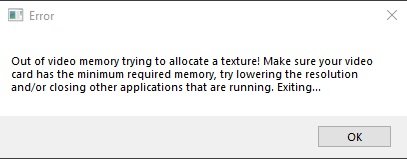
  3. Every time i start a new game, after getting past the first 2 marauder groups the game crashes with an "Out of Memory error". I have tried every graphics option, restarting, old and new video drivers, different resolutions, and every display mode (windowed, borderless, fullscreen). Specs Win 10, 5960x, 64gb ram, 1080ti GPU.
Configure browser push notifications

Chrome (Android)
  1. Tap the lock icon next to the address bar.
  2. Tap Permissions → Notifications.
  3. Adjust your preference.
Chrome (Desktop)
  1. Click the padlock icon in the address bar.
  2. Select Site settings.
  3. Find Notifications and adjust your preference.