


Arkannon
Members
-
Joined
-
Last visited
-
Arkannon changed their profile photo
-
Arkannon replied to Kefky's topic in Pillars of Eternity II: Deadfire Technical Support (Spoiler Warning!)Bloody hell Obsidian sucks fat donkey D at patching bugs... still a thing in 2026.
-
Arkannon replied to Arkannon's topic in Pillars of Eternity II: Deadfire General Discussion (NO SPOILERS)I just realised that's only for Full Attacks 😐
-
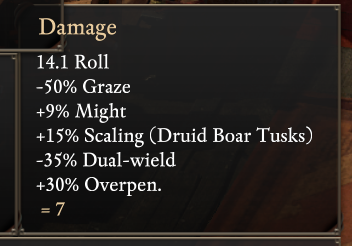
For some reason I am getting a -35% on my attacks in spiritshift form because of "Duel-wield", This doesn't seem to apply to my other characters when duel wielding only my spiritshift. I have the community patch so I don't know if that's causing it or what... ☹️
-
Arkannon replied to Myetel's topic in Pillars of Eternity II: Deadfire Technical Support (Spoiler Warning!)"Thanks for posting! We do currently have this bug logged and is expected to be included in our next patch for fixes."
-
Arkannon replied to radagastaba's topic in Pillars of Eternity II: Deadfire Technical Support (Spoiler Warning!)Never fixed unfortunately...
-
Arkannon replied to jww's topic in Pillars of Eternity II: Deadfire Technical Support (Spoiler Warning!)This is still a problem in 2026.

