


Selroy46
Initiates
-
Joined
-
Last visited
-
I really liked how turn-based mode was improved in POE1 compared to Deadfire, so I made a mod that replicates all the main changes in Deadfire. Big thanks to the devs who made the TBM patch for POE1 - I wanted to make this mod for years but couldn't have figured out how to properly do it. 🙂 Main features: Characters no longer take one turn per round, instead they take turns as often as initiative allows. Rounds are fully redesigned - 1 round is fixed interval of 6.0 initiative, all status effects adjusted to take it into account. Same balance changes that were made for POE1 (increased lethality, adjusted gun reload speed, etc) - everything is configurable and can be adjusted if you don't like it. 0 influence on RTwP mode or other mods, should be compatible with anything and easily removable in case you don't like it/have any issues. Nexus link: https://www.nexusmods.com/pillarsofeternity2/mods/854
-
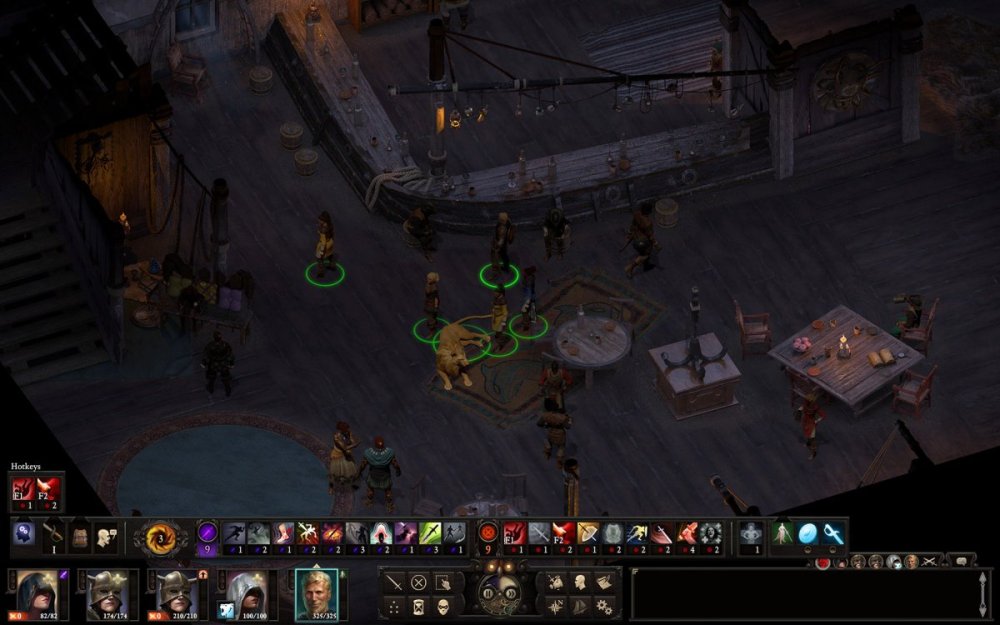
Selroy46 replied to Zhey's topic in Pillars of Eternity II: Deadfire General Discussion (NO SPOILERS)In theory, yes. But realistically, you need to pick all active abilities and no passives for it to become an issue. For example, here is a screenshot of Swashbuckler Eder when you pick all 19 active skills. Though I'm sure there are some builds that have more keys than a piano. 🙂 Also, I left the main active ability lovers (spellcasters) unchanged, because I found it far more convenient when spells are organized by levels, like in vanilla. P.S. I'm experimenting with moving part of ability bar to a second row (a new row above, where usually hotkeys are), but I don't like how it looks so far. Maybe I'll just move the buttons for AI, weapon swap, and items belt there, to make the first row a bit shorter.
-
Selroy46 replied to Zhey's topic in Pillars of Eternity II: Deadfire General Discussion (NO SPOILERS)Sorry for necroposting, but I stumbled upon this thread while searching for such mod. I found nothing, so I decided to make it myself. I published it on Nexus, here: https://www.nexusmods.com/pillarsofeternity2/mods/852 I hope it will help someone who is tired of making one extra click, like me. 😂
-
Right now I'm playing with different class abilities and I was wondering did someone managed to mod count of weapon attacks per turn? I was trying to make an ability with weapon attack to use a free action instead of a standard but without success. Yeah you can make a spell that deal some damage to use a free action, but I was wondering if it is possible for abilities with weapon attack specifically.

