


Reznor
Members
-
Joined
-
Last visited
-
Imagine a big worm. Like a blood worm. Yes. A gooey gargantuan guy. One that will gladly gobble up passerby (straight bars) It could be like a dune worm that like pops out and eats you. (That's kinda it i have no more ideas for this)
-
I know people are already asking for dragonfly, but I would actually like to request attack patterns. They could attack like overpowered versions of moths or butterflies.. but the dive bomb attack is dailed up to basically 11. I imagine they could be high up in the air and roam in teir 5 areas, ambushing prey like mantises. When they spot the player they dive bomb all the way from where they are at high speed. I know dragonflies don't make much noise irl, but it'd be cool if they made the neeeeoww sound like a bomb being dropped or a car zooming by. The sound would actually help because if that specific attack would be (almost) 1-hit kill, there should be a sign that its coming. Oh! Idea. Their gust attack would give affects, but causes almost way too much knockback so they can wind up for the attack again. They could have 3/5 hit combos and maybe even take in ideas from the mosquitos where they do cool loop-d-loops. All up for consideration ;)
-
I'm assuming that this was the house from the first Grounded game, based off of it's position according to the gas station. But a question is "Why is it so detailed compared to the other buildings?" (You can see parts of the other buildings on the sides of the photo) Obsidian even went to the length to show wires (why wires?) coming out of the original house's window. The wires might be just hooked up to the house's satellite dish (On the right). But why go to such lengths to make this one specific building so detailed? (The closer building is less detailed than it.) This just might be a cool Idea, but what if this is connected to having to go back to the Yard in the later game, as we have already seen there can be multiple maps with swapping between the abyss map and normal map in the new Into The Abyss update. WAIT-- Maybe this is where we find Dr. Tully! (As the characters state him going missing) There's a really good chance Obsidian might just want people to say "Oh that's the house!", and probably not anything special coming from it..
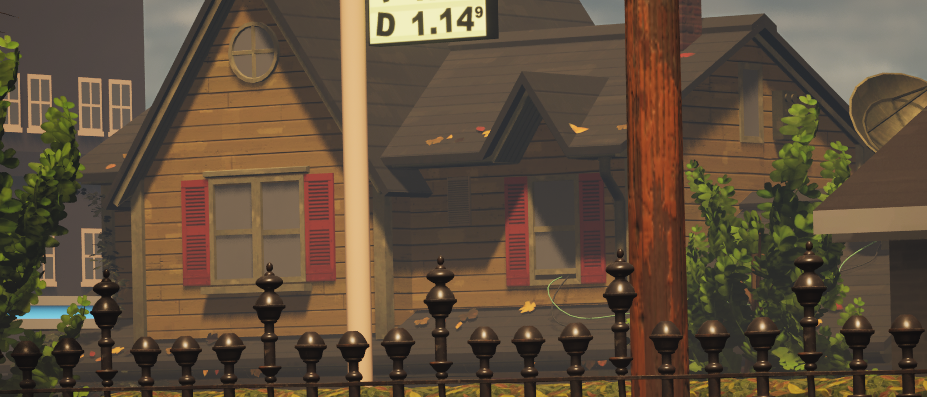
-
True, but there are some bug options outside we would be missing out on. Like I've seen some people ask for the Goliath birdeater which is native to South America. (Also, I think the game takes place near California [West USA] and red widows are all the way in florida.) I think my thought process is "if grounded 1 already stayed with just USA native bugs, why repeat it if there are some new and creative bugs around the world you would miss out on otherwise?"
-
It does really depend on what you want in the sequel, like the first game was mostly on showing how everyday bugs we find all the time can still be dangerous. There are probably a lot of people who agree with you, But I think what I was going for was kind of like how Jurassic World compares to the original, "...but you didn't ask for reality, you asked for more teeth." And by that I meant I was asking for an area that shows fear of the unknown in a different way than Into The Abyss. The unknown would be just how dangerous things can get. You would think you found the strongest enemy because you quickly lose to it, but then something new completely surpasses the former. Idk im just like explaining my thinking..
-
I meant caltrops
-
It could also be like throwable cow-traps.
-
I'm sorry, but I really wanted to say dragonflies in real life are SUPER AGGRESSIVE towards any bug and have almost 100% kill rate for bugs they attack. They are actually the most successful predators in the world, so I reccomend AT LEAST a level 5. (No offense but me personally would like to see these as dangerous rather than a high teir version of butterfly/moth.)
-
I do worry this might be a little too similar to axl, with the right adjustments this could be pretty fun though.
-
This probably won't happen, but I feel it would be really cool if there was a lab of some sorts that Ominent is bringing in other bugs from around the world/country to test and studying. Assuming that Ominent is really into trying to study new kinds of bugs (and not caring about safety that much), it'd be cool to see an area with exotic bugs. A couple that come to mind are red widows, bullet ants, and assassin bugs just to name a few. (Mabye you could even let them escape like the OGGRs or infected bugs from the first game.)

