Jump to content
View in the app

A better way to browse. Learn more.

Obsidian Forum Community

A full-screen app on your home screen with push notifications, badges and more.

To install this app on iOS and iPadOS
  1. Tap the Share icon in Safari
  2. Scroll the menu and tap Add to Home Screen.
  3. Tap Add in the top-right corner.
To install this app on Android
  1. Tap the 3-dot menu (⋮) in the top-right corner of the browser.
  2. Tap Add to Home screen or Install app.
  3. Confirm by tapping Install.

Greendawn

Initiates
  • Joined

  • Last visited

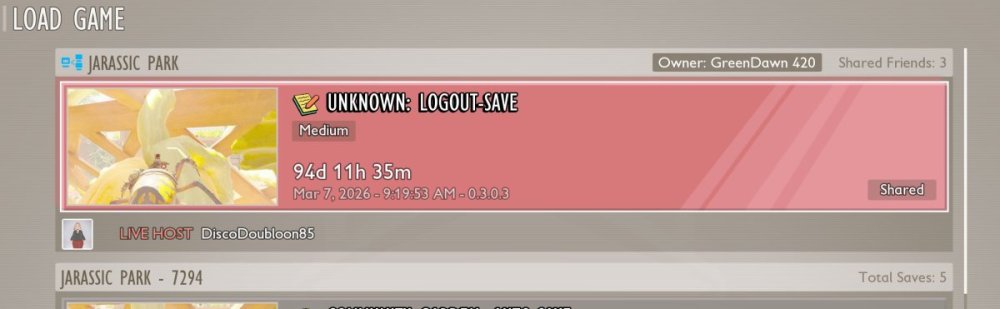
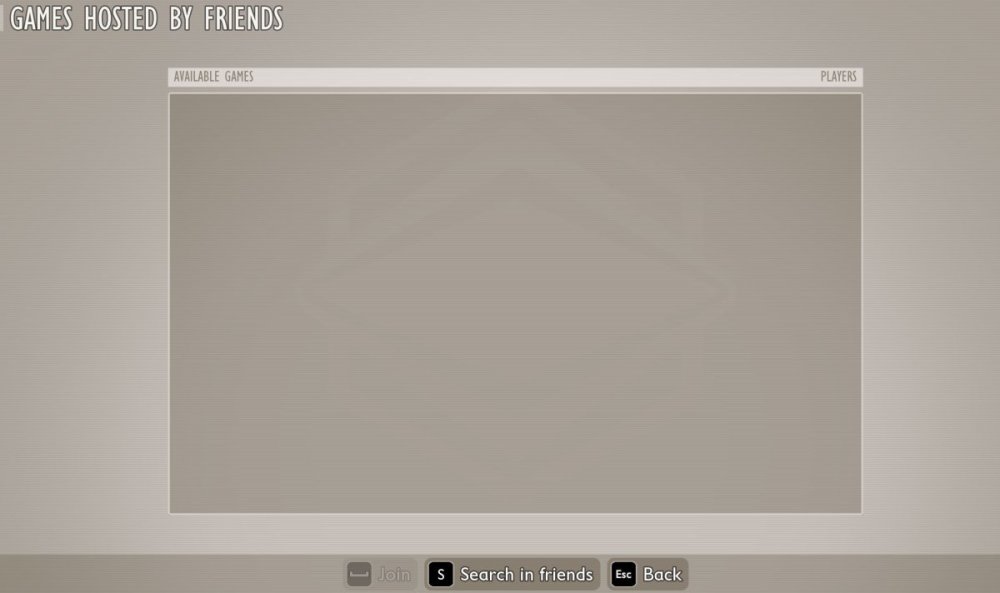
  1. Me, Wife, and Child used to join through multiplayer this past year. Me on the PC, they are on different Xboxes. Currently we cant find each other, even when making a shared world. Game would say the host is online and if we want to join, we try and on the "Games hosted by friends" page there is nothing there. Me and my wife have been playing since Grounded 1 Beta cross platform, Please Help! :-) P.S. Still a great game but we haven't been able to play for a couple of weeks since the update. . .
Account

Navigation

Search

Configure browser push notifications

Chrome (Android)
  1. Tap the lock icon next to the address bar.
  2. Tap Permissions → Notifications.
  3. Adjust your preference.
Chrome (Desktop)
  1. Click the padlock icon in the address bar.
  2. Select Site settings.
  3. Find Notifications and adjust your preference.