Jump to content
View in the app

A better way to browse. Learn more.

Obsidian Forum Community

A full-screen app on your home screen with push notifications, badges and more.

To install this app on iOS and iPadOS
  1. Tap the Share icon in Safari
  2. Scroll the menu and tap Add to Home Screen.
  3. Tap Add in the top-right corner.
To install this app on Android
  1. Tap the 3-dot menu (⋮) in the top-right corner of the browser.
  2. Tap Add to Home screen or Install app.
  3. Confirm by tapping Install.

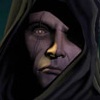
[480] Aumaua Portrait has beard. Aumaua Models don't.
Featured Replies

Portrait in question:


ZYaHj5I.jpg


This is bugging me, because I want to play an aumaua PC and use this portrait, but it doesn't fit at all with the models due to the beard. But I like the beard. I would prefer the fix to this be that we get beard options, rather than losing that portrait or having this poor dude's beard removed.

Configure browser push notifications

Chrome (Android)
  1. Tap the lock icon next to the address bar.
  2. Tap Permissions → Notifications.
  3. Adjust your preference.
Chrome (Desktop)
  1. Click the padlock icon in the address bar.
  2. Select Site settings.
  3. Find Notifications and adjust your preference.