Jump to content
View in the app

A better way to browse. Learn more.

Obsidian Forum Community

A full-screen app on your home screen with push notifications, badges and more.

To install this app on iOS and iPadOS
  1. Tap the Share icon in Safari
  2. Scroll the menu and tap Add to Home Screen.
  3. Tap Add in the top-right corner.
To install this app on Android
  1. Tap the 3-dot menu (⋮) in the top-right corner of the browser.
  2. Tap Add to Home screen or Install app.
  3. Confirm by tapping Install.

Ponky

Initiates
  • Joined

  • Last visited

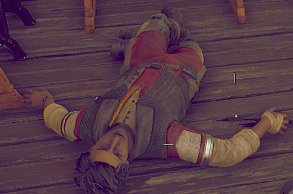
  1. SIDE QUEST SPOILERS!!! After finding Braxton's body in the home of the Mather's on Monarch, I believe Felix was supposed to start a dialouge with me I assume due to the text box over his name. I don't know if this was due to the mission or just because I progressed with him? Anyways, I found him like this after exiting the room, and his body just constantly skips along and he never gets up. I've tried fast traveling, going back to the ship and picking him for the team again, nothing works. He's also not on the ship due to this bug. Don't really know how to fix this, so either one of yall can help me or I never use Felix again lmao.

Account

Navigation

Search

Configure browser push notifications

Chrome (Android)
  1. Tap the lock icon next to the address bar.
  2. Tap Permissions → Notifications.
  3. Adjust your preference.
Chrome (Desktop)
  1. Click the padlock icon in the address bar.
  2. Select Site settings.
  3. Find Notifications and adjust your preference.