Next2132
Initiates
-
Joined
-
Last visited
Everything posted by Next2132
-
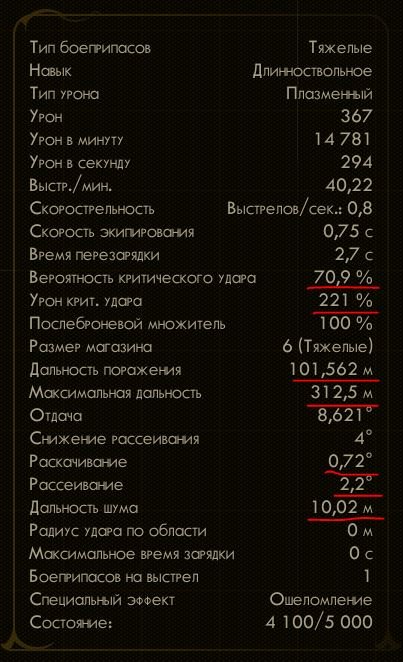
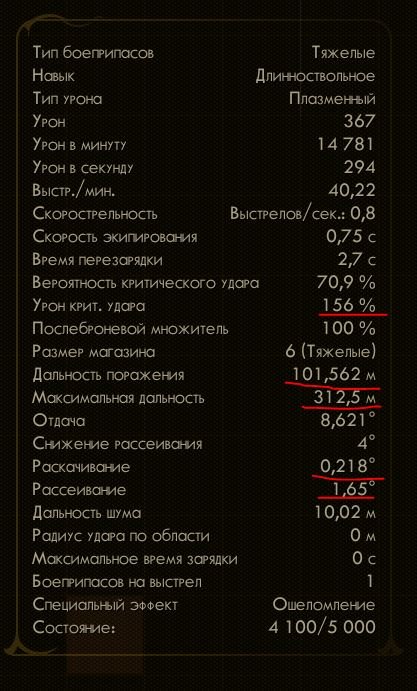
Статистика на экране просмотра оружия изменяется в зависимости от активного оружия. Например, если у тебя оружие с глушителем в руках, а ты просматриваешь оружие ближнего боя, дальность обнаружения 2м, а не 6м . Так же с разбросом и дальностью стрельбы. Так же не понятно как учитываюся бонусы от навыков стрельбы. Если в руках длинноствол, то на экране просмотра оружия стоит 221% крит урона, если в руках легкое оружие то 156%... ______________________________________________________________________________________________________ The statistics on weapon viewing screen the change depending on the active weapon. For example, if you have a weapon with a silencer in your hands, and you are viewing a melee weapon, the detection range is 2m, not 6m. Also with a spread and firing range. It is also not clear how bonuses from shooting skills are taken into account. If in the hands of a long barrel, then on the screen for viewing weapons is 221% crit damage, if in the hands of light weapons then 156% ...