Jump to content
View in the app

A better way to browse. Learn more.

Obsidian Forum Community

A full-screen app on your home screen with push notifications, badges and more.

To install this app on iOS and iPadOS
  1. Tap the Share icon in Safari
  2. Scroll the menu and tap Add to Home Screen.
  3. Tap Add in the top-right corner.
To install this app on Android
  1. Tap the 3-dot menu (⋮) in the top-right corner of the browser.
  2. Tap Add to Home screen or Install app.
  3. Confirm by tapping Install.

Disparrow

Initiates
  • Joined

  • Last visited

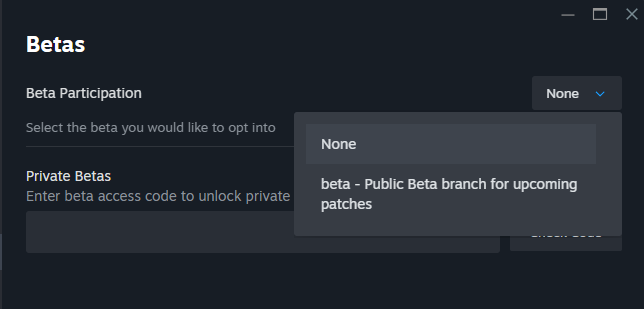
  1. Hi, I've been trying to play Pillars of Eternity II Deadfire on my PC but after playing once every few days it will start up and hang on a black screen after the Obsidian and Versus Evil cards. I've tried reinstalling, verifying files, changing the resolution, turning Vsync off, and installing the UK english language pack. Nothing works, but when googling this problem a solution is to try running on legacy mode Legacy Branch 3.7.0.1318 but I don't have that option on Steam. On betas I just have none and the public beta branch for upcoming betas. If there's a code to this version I'd love to get it because I finished a PoE 1 playthrough recently and I'd love to continue onto Deadfire.
Configure browser push notifications

Chrome (Android)
  1. Tap the lock icon next to the address bar.
  2. Tap Permissions → Notifications.
  3. Adjust your preference.
Chrome (Desktop)
  1. Click the padlock icon in the address bar.
  2. Select Site settings.
  3. Find Notifications and adjust your preference.