prosto_seriy
Initiates
-
Joined
-
Last visited
-
prosto_seriy replied to prosto_seriy's topic in The Outer Worlds 2: Technical Support (Spoiler Warning!)Please contact technical support by creating a bug report and attaching screenshots. I haven't seen any issues with 1.0.5.0 yet, but I just started playing. I immediately emailed them about the previous version along with this forum post, and apparently they responded somehow. Напишите в техподдержку через создание баг репорта с приложением скриншотов. У меня в 1.0.5.0 пока не вижу проблем но я только начал играть. Я по прошлой версии им сразу написал вместе с этим постом на форуме , они мне ответили и видимо както отреагировали и пофиксили но мож не до конца. По крайней мере в начале игры у меня нет этих проблем
-
prosto_seriy replied to prosto_seriy's topic in The Outer Worlds 2: Technical Support (Spoiler Warning!)Haha 😄 I stole Marty McFly’s time machine and went back to the future to install version 1.0.4.2! (just kidding — it was a typo, I meant 1.0.4.1)
-
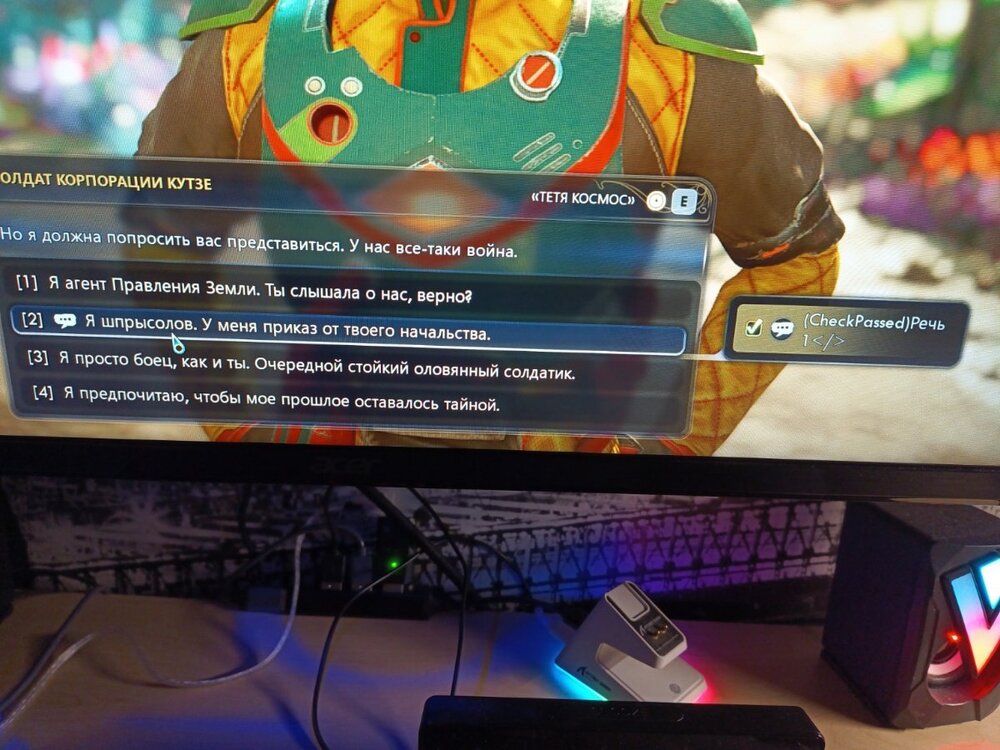
Hello! game version 1.0.4.2 patch I’ve encountered an issue with the Russian localization in The Outer Worlds 2. Some UI elements and dialogue skill checks display broken or untranslated text instead of proper Russian strings. This happens in several places, including: Dialogue skill checks (Speech, Intimidate, Lie, Science, etc.) Interactions with terminals and locks Various in-game prompts and tooltips On the English version everything works correctly — so it seems that some localization keys are missing or corrupted in the Russian .locres files. Below is an example of the issue — please see the screenshot. Could you please forward this to the localization team or confirm if an updated Russian language pack is planned in an upcoming patch?