Biblebrox
Initiates
-
Joined
-
Last visited
-
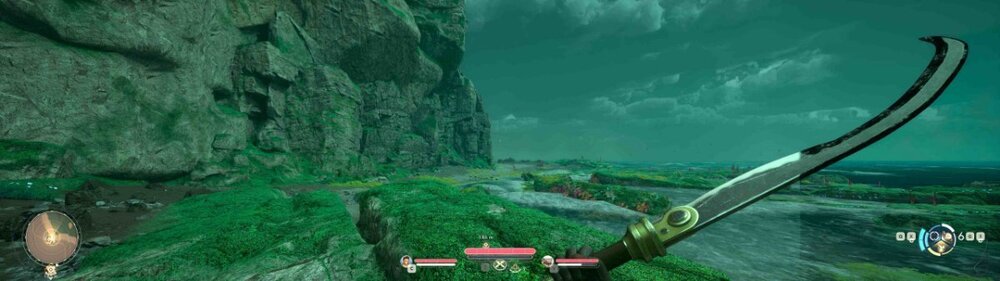
Description: When running the game at 5120×1440 (32:9), the right quarter of the image does not receive some post-processing effects, notably reflections, specular highlights, and indirect lighting. A sharp vertical boundary appears around 75 % of the screen width, and this border remains fixed relative to the display (not the camera). The rest of the image renders normally, with correct lighting, color grading, and shadowing. This issue is not related to FOV, HDR, or screen ratio settings. Hardware: CPU: AMD Ryzen 9 9950X3D GPU: NVIDIA GeForce RTX 5090 (Driver 581.80) RAM: 48 GB Monitor: Samsung Odyssey G9 (5120×1440 @ 240 Hz, 32:9) Display mode: Exclusive Fullscreen Game version: 1.0.4.1 (Game Pass PC – WinGDK) Repro Steps: Run the game at 5120×1440 fullscreen. Load an area with water or shiny surfaces. Notice the right quarter of the image missing reflections and specular effects. Switch to 16:9 → the issue disappears entirely. Tests performed Reflections, Lumen, SSR, TAA, and HDR toggled ON/OFF → no change. No upscalers active (DLSS, FSR, TSR = disabled). Shader cache and DerivedDataCache fully deleted → issue persists. Different resolutions tested: 16:9 → problem disappears completely. 32:9 → issue always visible. Reinstalled the game → problem persists. Borderless window mode → same issue (no option for 21:9). Tried multiple HDR/VRR/G-Sync and VSync combinations → no effect. Advanced Unreal Engine flags tested via Engine.ini: Forcing SSR quality / disabling Lumen → no change. Forcing Nanite and viewport override → game crash before shader load (Missing global shader ClearSplitQueueCS). Hardware resources not limiting factor (very high-end configuration). Workaround No reliable workaround available. Switching to 16:9 eliminates the artifact but removes ultra-wide support.