
Jump to content
View in the app

A better way to browse. Learn more.

Obsidian Forum Community

A full-screen app on your home screen with push notifications, badges and more.

To install this app on iOS and iPadOS
  1. Tap the Share icon in Safari
  2. Scroll the menu and tap Add to Home Screen.
  3. Tap Add in the top-right corner.
To install this app on Android
  1. Tap the 3-dot menu (⋮) in the top-right corner of the browser.
  2. Tap Add to Home screen or Install app.
  3. Confirm by tapping Install.

wanderson3294j

Initiates
  • Joined

  • Last visited

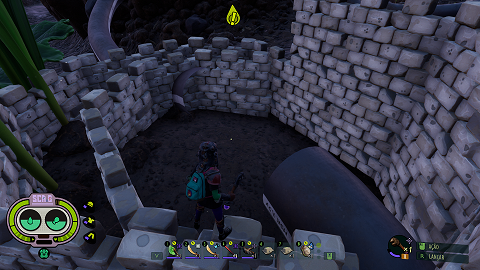
  1. cheguei na missao do javamatic e fui coletar o que faltava no jogo, quando finalmente fui rumo ao fim do jogo, me deparei com um bug que um dos locais que devo proteger simplismente sumiu e o jogo conta como se ele estivesse quebrado, sendo que eu consertei ele antes de ir completar o resto dos colecionaveis. e nao tem como eu voltar pra antes de ir completar o resto do jogo pois foi lá pro dia 100 e estou no dia 223
Configure browser push notifications

Chrome (Android)
  1. Tap the lock icon next to the address bar.
  2. Tap Permissions → Notifications.
  3. Adjust your preference.
Chrome (Desktop)
  1. Click the padlock icon in the address bar.
  2. Select Site settings.
  3. Find Notifications and adjust your preference.