


VividGhost34
Initiates
-
Joined
-
Last visited
Everything posted by VividGhost34
-
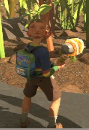
I was wearing the Clover Hood when it broke. That is when Pete's face was on the back of his head. The front of his face is still normal, but now he looks like Quirinus Quirrell from Harry Potter. I haven't repaired my hood yet to put it back on, that might fix the glitch, but I wanted to report it before it went away. Love the game so far! This in no way is gamebreaking for me, but I know the devs would want to know this bug is out there.
-
Going off of what OrANgE x Eddie said, I also think that the UI should not get in the way of our vision. I feel like it is too intrusive to our gameplay. It would be fine if it was a smaller wheel in the corner of the screen instead of the entire screen. If not at least make the game not blurry in the background of the weapon wheel.
