Jump to content
View in the app

A better way to browse. Learn more.

Obsidian Forum Community

A full-screen app on your home screen with push notifications, badges and more.

To install this app on iOS and iPadOS
  1. Tap the Share icon in Safari
  2. Scroll the menu and tap Add to Home Screen.
  3. Tap Add in the top-right corner.
To install this app on Android
  1. Tap the 3-dot menu (⋮) in the top-right corner of the browser.
  2. Tap Add to Home screen or Install app.
  3. Confirm by tapping Install.

Czaderblader

Initiates
  • Joined

  • Last visited

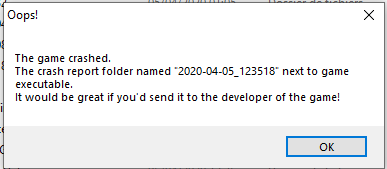
  1. Hi! I played PoE II for almost 90 hours (on Steam). After a longer brake (like 2-3 months) I decided to get familiar with the Deadfire again and finish second and third DLC. Unfortunately the launcher didn't let the game start - each time a launch it, it notifies me an error -"the game crashed". I attach the picture of it and all items from the crash folder. I reinstalled the game but that crashes happen all the time. It's strange as I played this game a lot on the same configuration (I didn't change any PC spec). Would you be so kind to tell me what can I do to play my game? Kind regards and greetings from Poland, Marcin crash.dmp error.log output_log.txt
Configure browser push notifications

Chrome (Android)
  1. Tap the lock icon next to the address bar.
  2. Tap Permissions → Notifications.
  3. Adjust your preference.
Chrome (Desktop)
  1. Click the padlock icon in the address bar.
  2. Select Site settings.
  3. Find Notifications and adjust your preference.